
Table of Contents
- Quick Comparison: Best Smart Home Gifts for Beginners
- How We Evaluated These Smart Home Gifts
- Smart Home Gifts for Safety and Security
- Smart Kitchen Gadgets for Home Cooks
- Easy Smart Home Setup for Beginners
- How to Start a Smart Home in 2026
- Troubleshooting Tips for Non-Techies
- Frequently Asked Questions
Last Updated: September 21, 2026
Quick Comparison: Best Smart Home Gifts for Beginners
The best smart home gifts for beginners in 2026 work straight out of the box, no hub, no app marathon. At Asknik, we built this guide around products that deliver value on day one, and every smart home gifts pick here shares three traits: setup in minutes, compatibility with mainstream voice assistants, and a clear everyday job.
Here's the quick rundown:
| Gift | Price | Best For | Setup Time |
|---|---|---|---|
| Wireless Security Camera | 46.99 | Home security beginners | Under 10 minutes |
| Smart Trash Bin | 67.99 | Hands-free kitchens | 2 minutes |
| Rotating Cube Timer | 27.99 | Cooking and focus | Out of the box |
| Smart Pill Box | 62.99 | Daily routine reminders | 5 minutes |
| Qi2 3-in-1 Charger | 95.99 | Nightstand organization | Plug and go |
How We Evaluated These Smart Home Gifts
Every product had to pass one test: could a non-technical person set it up without calling a friend? We weighted four factors.

- Setup difficulty: plug-and-play beats app-heavy every time
- Compatibility: works with common voice assistants and standard wireless protocols
- Everyday value: solves a real problem, not a novelty
- Build quality: survives daily use in a busy home
A beginner doesn't need the most advanced device, they need one they'll keep using after the novelty wears off.
Smart Home Gifts for Safety and Security
A smart home gift for safety should give real-time alerts and remote access without a monthly contract. For beginners, start with a wireless camera that records motion and pushes notifications to a phone.

The Ασύρματη κάμερα ασφαλείας με καταγραφικό from Asknik fits that brief. It captures 1080P footage, tracks motion automatically, and switches to infrared night vision when the lights go down. Any suspicious movement triggers an instant alert through the app, wherever you are.
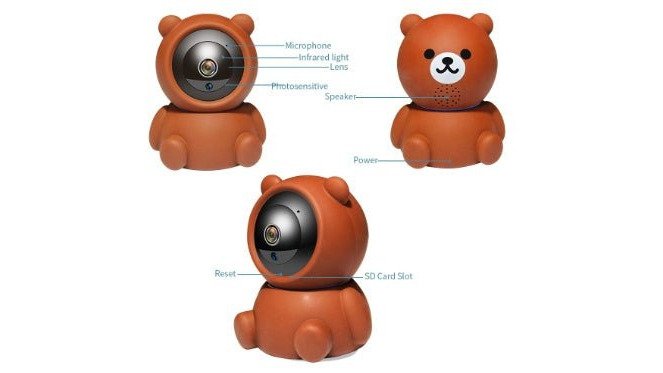
Setup is simple: plug it in, connect to WiFi, scan a code. Cloud storage is handled on its own, so there's no recorder box to hide.
For families, pair the camera with the Έξυπνο Κουτί Χαπιών με Ξυπνητήρι & Bluetooth. It sounds like an odd pairing until you remember that medication schedules and home safety often go hand in hand for older relatives. The pill box holds separate compartments for each day and sounds an alarm at the times you set.
Smart Kitchen Gadgets for Home Cooks
A smart kitchen gadget earns its spot when it saves time you'd otherwise lose to guesswork. Our kitchen and cooking range leans on that idea: tools that handle one job well, work without a manual, and deliver a visible result on first use.
The Χρονόμετρο Κύβος is the clearest example. Turn the cube to the side showing 5, 10, 15, 20, 30, or 60 minutes and the countdown starts within a second, no buttons, no menu. It has three volume levels, including silent vibration, and remembers your last setting. For anyone cooking with hands full, that gravity sensor design is the whole point.
Two more kitchen-friendly picks round out the segment. The LED Φωτιστικό Φλόγας με Αρωματικό Διαχύτη & Υγραντήρα combines a realistic flame effect with a 150ml essential oil diffuser, three timer settings, and seven lighting colours. It covers rooms up to 10m² and shuts off automatically when the tank empties, ambience near the stove without the fire risk.
Then there's the Έξυπνη Γλάστρα for the cook who keeps fresh herbs. Seven sensors and an AI chip handle watering automatically, track water levels in real time, and run personalised care programmes. The built-in screen doubles as a digital photo frame when it's not tending basil, removing the guesswork from keeping rosemary or mint alive.
What separates these from generic kitchen gadgets is that each solves a specific, recurring problem, a timer that starts with a twist, a diffuser that doubles as mood lighting, a planter that waters itself. That's the pattern to look for.
Έξυπνος Αυτόματος Κάδος Απορριμμάτων με →
If you're shopping for someone who already has the basics, pair a kitchen timer with the Έξυπνο Κουτί Χαπιών με Ξυπνητήρι & Bluetooth from the safety section. Medication schedules and cooking routines often overlap for older relatives who manage their own meals, and the pill box's daily compartments and alarms fit naturally into a kitchen command centre.
For more kitchen and cooking inspiration, browse our full range at Asknik, where every product is selected for ease of use and everyday value.
Easy Smart Home Setup for Beginners
Easy smart home setup for beginners comes down to one rule: start with one device, get it working, then add the next.
Here's the setup order that avoids the mess:
- Set up your WiFi router on the 2.4GHz band, since most smart devices can't see 5GHz networks
- Install the manufacturer's app and create one account
- Add your first device and confirm it responds
- Name each device clearly, like "Kitchen Camera" instead of "Device 3"
- Only then add a second device
What most gift guides skip is what to do when setup fails. Before returning anything, work through three checks:
- WiFi band mismatch: Confirm your phone and the device are on the same 2.4GHz network. Some routers split 2.4GHz and 5GHz into separate names, so you may need to select the 2.4GHz one manually.
- Stale firmware: Open the app and check for updates. A device that shipped six months ago may need a patch before it will connect properly.
- Distance from router: If the device is in a far corner, try pairing it near the router first, then move it to its final spot. If it drops offline there, you need a mesh node or a repeater.
How to Start a Smart Home in 2026
To start a smart home in 2026, pick devices that speak the same language. Interoperability is the deciding factor, and Matter is why.
- Matter or WiFi support over proprietary wireless protocols
- Local control where possible, so devices still work if the internet drops
- Firmware updates from a manufacturer with a track record
Troubleshooting Tips for Non-Techies
Most smart home problems have three causes: WiFi band mismatch, stale firmware, or a device too far from the router.
Work through this before you return anything:
| Problem | Likely Cause | Fix |
|---|---|---|
| Device won't pair | Connected to 5GHz network | Switch to 2.4GHz in router settings |
| App shows "offline" | Weak signal or dropped connection | Move closer to router or add a mesh node |
| Slow response to commands | Network latency | Reduce devices on the network or upgrade router |
| Feature missing | Outdated firmware | Check for updates in the app |
| Camera feed stutters | Bandwidth overload | Lower resolution or limit simultaneous streams |
Frequently Asked Questions
What are the best smart home devices for someone just starting out?
Start with a wireless security camera and a smart plug. The Asknik wireless security camera (€46.99) sends real-time alerts and records motion, while a smart plug lets you control lamps or small appliances from your phone. Both are plug-and-play and need no hub. For a kitchen-friendly option, a rotating cube timer (€27.99) is a fun, practical gift that works without Wi-Fi. These three cover security, convenience, and daily use without overwhelming a beginner.
Are smart home gadgets easy to set up for non-techies?
Most entry-level smart home gifts are designed for easy smart home setup. Devices like the Asknik smart trash bin and the wireless security camera work right out of the box with a simple app download. The camera connects via Wi-Fi and the trash bin runs on batteries with a motion sensor. No wiring or technical skills needed. For the smart planter, you just fill the water tank and it handles the rest. If a device needs a hub, the instructions guide you step by step.
What are the most useful smart home devices for the kitchen?
The rotating cube timer (€27.99) is a standout for cooking. Flip it to 5, 10, 15, 20, 30, or 60 minutes and the countdown starts automatically. It has a silent vibration mode and a loud 90-100dB alarm, so you can hear it from another room. For plant lovers who cook with fresh herbs, the smart planter (€111.99) keeps herbs watered automatically. The flame aromatherapy diffuser (€100.99) adds ambiance to kitchen dinners with a realistic LED flame effect.
How do I choose a smart home gift for a beginner?
Look for three things: no hub required, app-controlled simplicity, and immediate usefulness. The Asknik wireless security camera (€46.99) fits all three. It works with a phone app, sends motion alerts, and installs in minutes. For a fun, low-pressure gift, the planetarium projector (€54.99) is a hit with kids and adults. Avoid devices that need complex wiring or multiple accounts. If the recipient rents or travels, pick portable items like the smart pill box (€62.99) or the Qi2 wireless charger (€95.99).
Which smart home devices offer the best value for beginners in 2026?
The rotating cube timer at €27.99 is the lowest-cost entry point and gets daily use in the kitchen. The wireless security camera at €46.99 delivers professional-grade monitoring at a budget price. For plant owners, the smart planter at €111.99 replaces guesswork with automatic watering and a digital photo frame. The Qi2 3-in-1 charger at €95.99 consolidates three charging cables into one device. Each of these smart home gifts solves a clear problem without requiring a monthly subscription.