
Table of Contents
- Why Smart Lighting Matters for Home Defense
- Integrating Motion Sensors with Smart Lights
- How to Set Up Vacation Mode on Smart Lights
- Smart Home Security Lighting Tips for Maximum Protection
- Connecting Smart Lights to Your Central Security Hub
- Privacy and Network Security Considerations
- Energy Efficiency and Cost Savings
- Frequently Asked Questions
Last Updated: September 18, 2026
Why Smart Lighting Matters for Home Defense
Smart lighting home security is one of the most practical additions to any home defense plan. It deters intruders, creates the illusion someone's home when you're away, and integrates seamlessly with motion sensors and security cameras. Unlike traditional fixed lighting, smart lights give you control from anywhere, your phone, voice commands, or automated schedules.

The real advantage isn't just the light itself. It's the intelligence behind it. Motion-activated lighting catches intruders off guard. Occupancy simulation schedules make your home look occupied while you're traveling. And when paired with a central security hub, smart lights become part of a coordinated defense system that responds faster than you could manually.
Integrating Motion Sensors with Smart Lights
Motion detection is where smart lighting stops being decorative and starts being defensive. A motion sensor paired with a smart bulb or switch triggers light instantly when movement is detected, flooding dark areas with brightness. Most intruders avoid well-lit spaces, the sudden illumination makes them a target for neighbors or cameras.

The setup is straightforward. A PIR (passive infrared) motion sensor detects body heat and triggers your smart light within seconds. You can adjust sensitivity to ignore small animals or wind-blown debris. Many systems let you set different behaviors: full brightness for intrusions, dimmed light for nighttime bathroom trips, or no light during daytime hours.
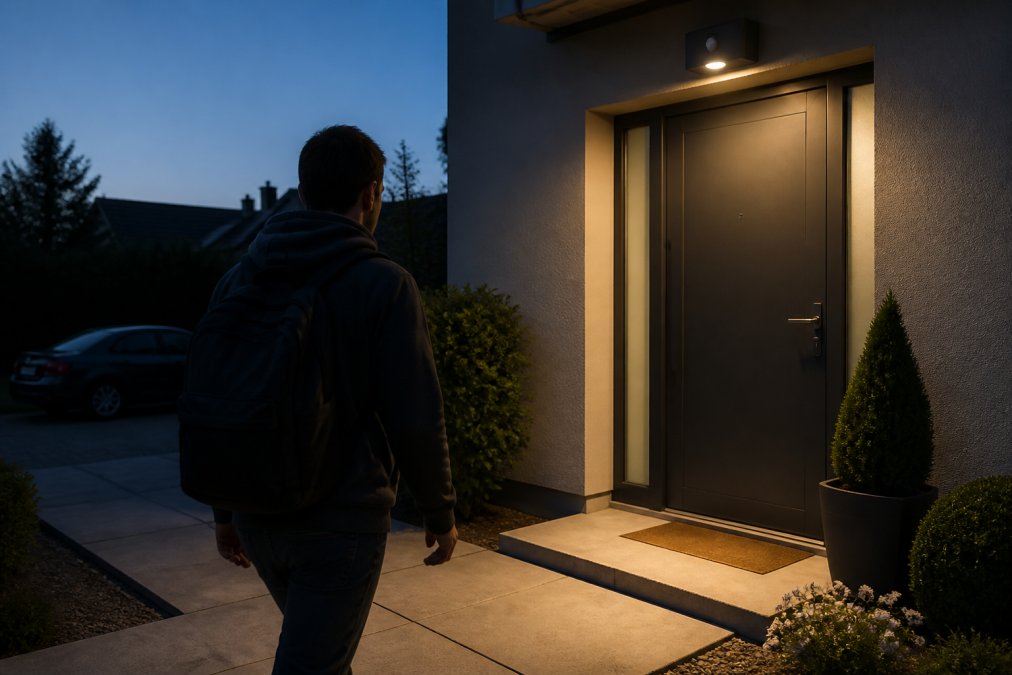
Consider these placement strategies for motion-activated lighting:
- Entry points: Front door, back door, garage entrance
- Perimeter areas: Driveway, patio, side yard
- Dark zones: Areas blocked from street lights or neighboring properties
- Blind spots: Corners where intruders could hide while approaching
The Asknik catalog includes the Automatic LED USB Magnetic Wooden Wireless Night Light with PIR Motion Sensor at 20.99, which offers reliable motion detection up to 4 meters and automatic shutoff after 15 seconds of inactivity. This type of fixture works well for interior hallways and corridors, creating a layered defense inside your home.
Pair motion sensors with your security cameras for maximum effect. When motion triggers light, cameras capture clearer footage. The combination sends a clear message: this property is monitored and defended.
How to Set Up Vacation Mode on Smart Lights
Occupancy simulation is your secret weapon when you're away. Vacation mode automates lighting schedules to mimic normal living patterns, lights turn on and off at different times in different rooms, making your home look lived-in to anyone watching.
The setup takes minutes. Most smart home platforms let you create schedules that repeat daily or weekly. You might set your living room light to turn on at 7 PM and off at 11 PM, your bedroom light to activate at 10 PM and dim by midnight, and your kitchen light to come on briefly at 6 AM.
Here's what an effective vacation schedule looks like:
| Time | Room | Action | Purpose |
|---|---|---|---|
| 6:00 AM | Kitchen | Turn on (30 min) | Morning routine simulation |
| 7:00 PM | Living Room | Turn on (4 hours) | Evening activity |
| 8:30 PM | Bedroom | Turn on dimmed (3 hours) | Nighttime presence |
| 11:00 PM | All lights | Turn off | Sleep pattern |
The randomness matters. Set lights to turn on at slightly different times each day, 6:47 PM instead of 7:00 PM, 10:13 PM instead of 10:00 PM. This unpredictability makes the pattern look genuinely human, not robotic.
Many smart home systems also support geofencing, which automatically adjusts lighting based on your phone's location. Leave your home and the system switches to vacation mode. Approach your driveway and lights turn on to welcome you. This integration removes the need to manually toggle settings.
Smart Home Security Lighting Tips for Maximum Protection
Effective smart lighting home security goes beyond motion sensors and vacation mode. Think strategically about coverage, brightness, and integration with your broader security ecosystem.
Layer your lighting zones. Create multiple circles of illumination around your property. Outer perimeter lights cover the driveway and property boundary. Mid-zone lights illuminate entryways and windows. Inner lights protect interior blind spots. Intruders avoid moving through multiple lit areas, the effort and exposure aren't worth the risk.
Match brightness to purpose. Entry points need full brightness to deter approach and enable camera footage. Perimeter areas benefit from moderate light that covers ground without creating harsh shadows where intruders could hide. Pathways need enough light for safe movement without wasting energy on dark areas no one uses.
Use color temperature strategically. Warm white light (2700K) feels residential and natural. Cool white light (5000K) looks institutional and monitored. A mix signals "this home is both occupied and defended." Avoid colored light for security zones, it looks decorative, not serious.
Integrate with your security cameras. Smart lighting and security cameras are a matched pair. Good lighting produces clear footage. Clear footage deters intruders who know they're being recorded. Many modern cameras trigger lights automatically when motion is detected, multiplying the deterrent effect.
Set realistic schedules. Vacation mode only works if it mimics your actual patterns. If you never turn on your bedroom light before 10 PM, don't set it to 9 PM while away. If you're a morning person who lights up the kitchen at 5:30 AM, keep that schedule. Intruders study properties, unrealistic patterns raise suspicion.
Ασύρματη κάμερα ασφαλείας με καταγραφικό →
Connecting Smart Lights to Your Central Security Hub
A central security hub transforms isolated smart lights into a coordinated system. Instead of controlling each light individually through separate apps, everything connects through one platform. The hub receives alerts from motion sensors, security cameras, and door locks, then coordinates lighting responses automatically.
Wireless Protocols and Ecosystem Integration
Smart lights communicate through wireless protocols: WiFi, Zigbee, Z-Wave, or Thread. Each has trade-offs. WiFi offers range and simplicity but consumes more power. Zigbee and Z-Wave use mesh networks where devices relay signals through each other, extending range and reliability. Thread provides faster response times but requires compatible devices.
Choose a hub that supports your protocol. If you already own Philips Hue lights (Zigbee), a hub supporting Zigbee makes sense. If you prefer WiFi simplicity, select a WiFi-native hub. Avoid mixing incompatible protocols, you'll spend more time troubleshooting than securing.
The best approach is ecosystem integration. Select one primary platform, Apple HomeKit, Google Home, Amazon Alexa, or Samsung SmartThings, and build around it. Most major smart light brands support multiple ecosystems, so you're not locked in. This flexibility lets you add devices gradually without replacing your entire system. Expanding this unified control to include smart window shade integration creates a more cohesive automated environment that enhances both the security and the energy efficiency of your home.
Interoperability matters for security. Your motion sensors, lights, cameras, and door locks should all communicate through the same hub. When a door opens and motion is detected, the system triggers lights automatically. When you arm your security system, all lights switch to perimeter mode. When you leave home, vacation mode activates across the entire property. This coordination happens without your intervention.
Voice Control and Mobile App Access
Voice control adds convenience without sacrificing security. "Alexa, turn on the porch light" beats fumbling for your phone in the dark. But voice control is a feature, not a replacement for automation.
Your mobile app gives you remote access from anywhere. Traveling and forgot to activate vacation mode? Open the app and enable it from the airport. Noticed unusual activity on your security camera? Activate all exterior lights to scare off intruders. Arriving home early? Disable motion sensors so you don't trigger constant alerts walking through your own house.
The app should show real-time status for every light, motion sensor, and camera. You should see which lights are on, which are scheduled, and which have detected motion recently. This visibility helps you spot patterns and adjust your security plan.
Privacy and Network Security Considerations
Smart lighting exposes your home to network vulnerabilities. Unsecured smart lights can be hacked, hijacked for botnet attacks, or used to spy on your patterns. Treat security lighting as seriously as you treat security cameras.
Use strong passwords. Change default credentials immediately. Create unique, complex passwords for your hub and each connected device. Use a password manager to track them. Weak passwords are the easiest entry point for attackers.
Enable two-factor authentication. Your hub and app should require a second verification method, a code from your phone, a biometric scan, or a security key. This prevents attackers from accessing your system even if they steal your password.
Keep firmware updated. Smart light manufacturers release security patches regularly. Enable automatic updates when possible.
Energy Efficiency and Cost Savings
Smart lighting saves energy through automation. Lights turn off automatically when rooms are empty. Brightness adjusts based on natural light and time of day. Vacation mode uses minimal power compared to leaving lights on manually.
Frequently Asked Questions
Do smart lights actually deter burglars and intruders?
Yes, smart lighting deters intruders by creating the appearance of occupancy. Automated schedules that turn lights on and off at different times make your home look lived-in even when you're away. Motion-activated lighting also catches movement and alerts you in real time, making your home a less attractive target. Combined with security cameras and a central security hub, smart lighting becomes part of a comprehensive home defense strategy.
What's the difference between indoor and outdoor smart lighting for security?
Outdoor smart lights focus on perimeter security, illuminating entry points like doors, windows, and driveways to deter intruders and provide visibility for security cameras. Indoor smart lights create occupancy simulation and emergency response integration through automated schedules and motion detection. Outdoor fixtures typically need weather resistance and higher brightness, while indoor lights prioritize scheduling flexibility and ecosystem integration with your smart home platform.
Can smart lighting be integrated with existing home security systems?
Yes, most modern smart lighting systems connect to a central security hub via wireless protocols like WiFi, Zigbee, or Z-Wave. Your security system can trigger lights to turn on when motion is detected or when alarms are activated. This integration allows real-time alerts through your mobile application and enables if-this-then-that automation rules. Check compatibility between your lighting brand and security platform before purchasing.
Do smart lights increase my electricity bill significantly?
No. Smart LED bulbs consume 75-80% less energy than traditional incandescent bulbs. Automation features like motion detection and scheduled turn-off actually reduce energy consumption by preventing lights from running unnecessarily. While the upfront cost of smart bulbs and sensors is higher, the long-term energy savings can be substantial.