
Table of Contents
- Why Your Galaxy Light Projector Needs Regular Care
- How to Clean Your Projector Lens Without Damage
- Galaxy Projector Troubleshooting: Fading Stars and Clicking Noises
- Managing Heat, Ventilation, and Power for Better Performance
- Galaxy Light Projector Lifespan: What to Expect and How to Extend It
- Internal Component Care for Laser-Based Projectors
- Long-Term Storage and Seasonal Maintenance Protocols
- Conclusion: A Simple Routine for Years of Stargazing
- Frequently Asked Questions
Last Updated: September 16, 2026
Why Your Galaxy Light Projector Needs Regular Care
A galaxy light projector throws drifting nebulae and star fields across a room using a focused light source and a lens. That lens and the air channels around it collect dust fast, and dust dulls the show. The projector still powers on, but the stars look weaker than in week one.
The fix is rarely a repair. It is a routine.
Most owners treat a projector like a lamp: plug it in, forget it, replace it when it dies. Optical devices do not work that way. Dust scatters light, blocked vents trap heat, and heat shortens component life. A ten-minute routine every few weeks keeps projection quality close to new.
Below, we break down exactly how to maintain your galaxy light projector, from lens cleaning to storage, plus the two problems owners report most: fading stars and clicking noises.
How to Clean Your Projector Lens Without Damage
Clean the lens with a dry, lint-free microfiber cloth or a dedicated lens pen, never household glass spray. Aggressive solvents can permanently cloud the lens cover.

Work in this order:
- Power the projector off and let it cool for at least 15 minutes.
- Blow loose dust off with a compressed air can held at an angle, never straight down into the housing.
- Wipe the lens cover in one gentle circular pass with a microfiber cloth.
- Use a lens pen for stubborn smudges, brushing first, then the pad.
Pressure is the enemy: pressing hard risks scratching the coating that keeps the image sharp.
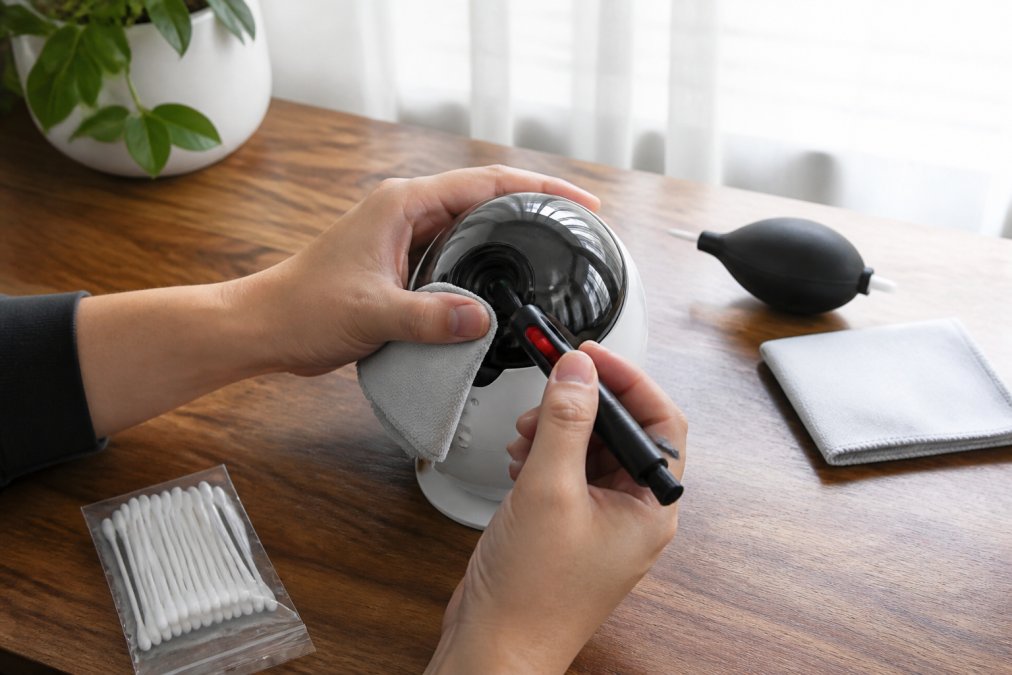
Tools You Need for Safe Lens Cleaning
A basic kit covers everything:
- A lint-free microfiber cloth
- A lens pen with a brush and pad
- Compressed air for vents and crevices
- A soft brush for the housing
- Distilled water for a damp wipe, only if a smudge resists dry cleaning
The Asknik 20-in-1 electronics cleaning kit includes a cleaning pen with a metal tip, an air blower, soft and hard brushes, and microfiber cloths, which covers lens, vents, and housing in one box. For tighter spots around the lens ring, the Asknik cleaning pen for earbuds and keyboards has a steel tip and a fine brush that reach where a cloth cannot.
Galaxy Projector Troubleshooting: Fading Stars and Clicking Noises
Fading stars are almost always a dust or heat problem, not a dead LED. Before assuming the projector is broken, clean the lens and check the vents.
Two symptoms come up again and again with these devices:
Fading stars. The projection looks dimmer, or the nebula effect washes out. Dust on the lens and a clogged intake are the usual causes. Clean both, run the projector for 20 minutes, and compare. If brightness returns, it was maintenance, not hardware.
Clicking noises. A clicking or ticking sound usually points to the cooling fan. Dust on the fan blades makes them unbalanced, and the noise worsens over time. Power down, let it cool, and clear the vents with compressed air. If the noise continues, the fan bearing is likely worn, a repair, not a cleaning job.
Why Stars Fade and How to Fix It
Stars fade for three reasons: dust on the lens, heat from blocked airflow, and normal LED aging. The first two you can fix in minutes; the third you can only slow down.
- Wipe the lens cover with a microfiber cloth
- Blow out the intake and exhaust vents
- Move the projector off carpet and away from curtains
- Run it in shorter sessions rather than all night
If the image is still dim after a full clean and cool-down, the light source is likely degrading. That is expected with age, and replacement then makes more sense than repair.
Σετ Καθαρισμού Συσκευών 20-σε-1 →
Managing Heat, Ventilation, and Power for Better Performance
Heat is the biggest killer of a galaxy light projector. It needs open air on every vented side, every time it runs.
Placement matters more than most owners expect. A shelf against a wall or a soft blanket blocks the airflow that keeps components cool. Give it at least a hand's width of clearance on all sides, and keep it out of direct sun.
On the power side, three habits extend the life of the unit:
- Use the original cable and adapter, or a matching replacement
- Unplug during storms to protect against surges
- Let the projector rest between long sessions instead of running it continuously for hours
A power cycle, switching the unit fully off and letting it cool before restarting, also clears minor glitches like a frozen light pattern. It costs nothing and solves more problems than people expect.
Galaxy Light Projector Lifespan: What to Expect and How to Extend It
A well-maintained galaxy light projector typically runs for several years, while a neglected one can dim noticeably within months. Three mechanisms drive the difference: heat degradation of the light source, dust scattering on the lens and internal optics, and power-supply stress.
LED-based units generally outlast cheaper alternatives because the light source generates less heat. Most consumer-grade LEDs are rated for 20,000 to 50,000 hours, but that assumes the LED stays cool. When vents clog and internal temperatures rise, the phosphor coating degrades faster and brightness drops before the rated hours. A projector that runs hot can dim in six months; a cool-running unit holds brightness for years. Consistent airflow management remains the most effective strategy for maintaining lighting equipment, ensuring that your projector continues to perform reliably throughout its entire operational lifespan.
Laser-based models hold brightness longer because the laser diode is less heat-sensitive than an LED phosphor, but they are more sensitive to dust around the internal optics. A speck on a laser's collimating lens scatters the beam and creates patchy projection.
| Maintenance Habit | How Often | Main Benefit |
|---|---|---|
| Wipe lens cover | Weekly | Keeps stars sharp |
| Clean vents and fan | Monthly | Prevents overheating |
| Check cables and ports | Monthly | Avoids power faults |
| Deep clean housing | Every 3 months | Removes hidden dust |
| Full storage prep | Seasonal | Protects during downtime |
Internal Component Care for Laser-Based Projectors
Laser-based projectors need the same external care as LED models, plus extra attention to internal airflow, where laser units fail first.
- Never open the housing; you risk misaligning the optics
- Keep the projector off the floor, where dust settles fastest
- Replace any removable filter if your model has one
- Store the unit covered when not in use
Long-Term Storage and Seasonal Maintenance Protocols
Store your projector clean, cool, and covered, and it will come back exactly as you left it. Storage is where projectors quietly degrade, and two variables matter most: battery care for portable units and moisture control for plug-in units.
Before putting the unit away for a season:
- Run a full clean: lens, vents, housing
- Let it cool completely, then wipe it dry
- Coil the cable loosely, never tightly around the body
- Place it in its original box or a dust bag
- Store it somewhere dry, away from damp basements and hot attics
- Inspect the lens for fog or dust
- Blow out the vents with compressed air
- Test the cable and adapter for cracks or loose connections
- Run the projector for 10 minutes and check for unusual noise or dimming
Conclusion: A Simple Routine for Years of Stargazing
The challenge with any projector is that the decline is gradual. You do not notice the stars fading until the room feels flat, and by then dust has sat there for months. A weekly lens wipe and a monthly vent clean stop that slide before it starts.
Frequently Asked Questions
How do I clean the lens of my galaxy projector?
First, unplug the projector and let it cool. Use a soft brush or compressed air to remove loose dust. Then, dampen a lint-free microfiber cloth with distilled water or isopropyl alcohol and gently wipe the lens in a circular motion. Never spray liquid directly onto the lens. For stubborn spots, use a lens pen designed for optical clarity.
Can galaxy projectors be left on all night?
Most galaxy projectors are designed for extended use, but leaving them on all night can cause overheating and reduce the lifespan of the LED or laser diode. Check your model's manual for recommended run times. If you want to fall asleep with it on, use the built-in timer or a smart plug to turn it off after 1-2 hours.
Why is my galaxy light projector making a clicking noise?
A clicking noise often comes from the rotating motor or a loose piece of debris near the cooling fan. Turn off the projector and inspect the vents for dust or obstructions. If the noise persists, the motor may need lubrication or replacement. Contact the manufacturer if the unit is under warranty.
How often should I clean my galaxy light projector?
For best performance, clean the lens and exterior every 2-4 weeks if used daily. Check and clean the ventilation vents monthly to prevent dust accumulation. If you notice dimming stars or a hazy projection, clean the lens immediately. Regular preventative care extends the lifespan of your projector.