
Table of Contents
- AirTag Insoles Explained: How Hidden Shoe Trackers Work
- Can You Put an AirTag Inside a Shoe?
- Fit, Comfort, and Sizing: What to Check Before You Buy
- AirTag Insoles for Kids: Safety and Everyday Use
- AirTag Insoles for Adults: Commuters, Seniors, and Travelers
- AirTag Alternatives for Android Users
- Privacy, Consent, and Responsible Tracking
- Frequently Asked Questions
Last Updated: October 7, 2026
AirTag Insoles Explained: How Hidden Shoe Trackers Work
AirTag insoles are shoe inserts with a built-in compartment that holds an Apple AirTag under the arch of your foot, keeping the tracker hidden while you walk. This guide from Asknik covers how they work, who they suit, and what to check before buying.
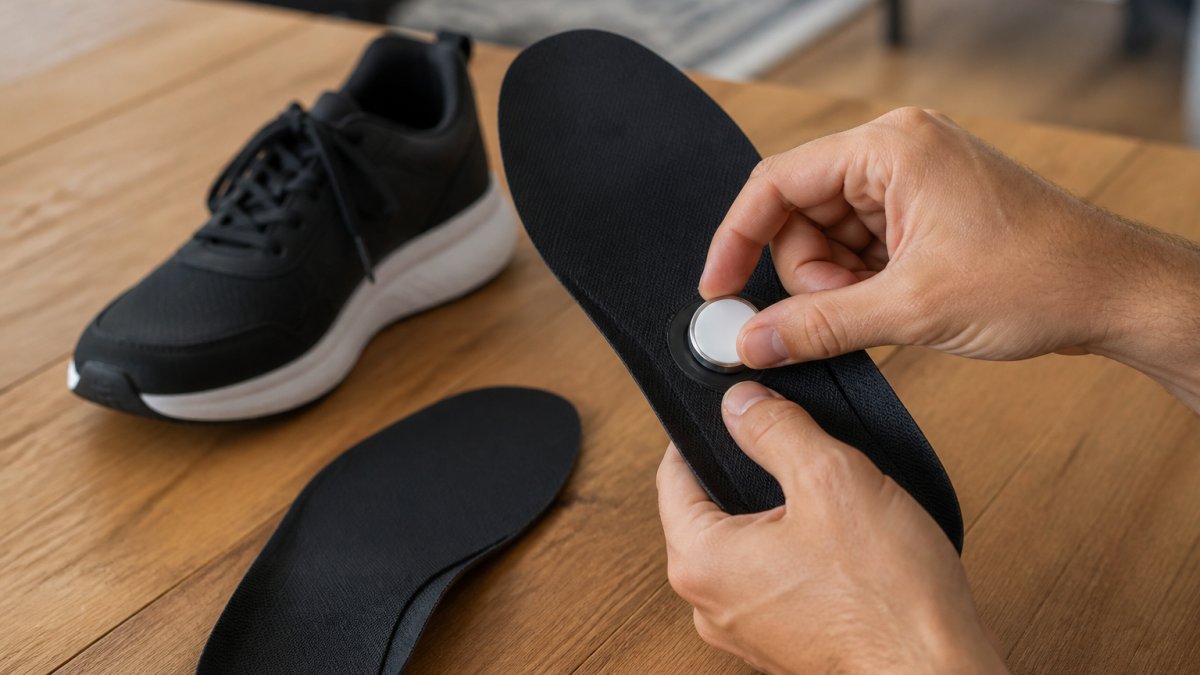
The idea is simple. You lift the removable insole from a shoe, drop the AirTag into the shaped cutout, and put the insole back. The tracker sits beneath your arch, invisible to anyone watching you tie your laces. Unlike a wristband or a clip-on tag, a shoe insert is not something a child can pull off and leave on a park bench.
That matters because most lost-item stories start with a device that was easy to remove. A tracker strapped to a bag gets set down. A tag on a lanyard gets handed to a friend. A tracker inside a shoe stays on the foot until the shoe comes off.
One thing to get straight before you buy: the AirTag itself is not included. You supply your own. The insole is just the holder.
Can You Put an AirTag Inside a Shoe?
Yes, you can put an AirTag inside a shoe, but only if there is a proper cavity for it. Dropping a loose AirTag into a shoe puts hard plastic directly against your heel or arch, which gets uncomfortable fast.
A dedicated insole solves that by placing the tracker in a recessed pocket under the arch, cushioned on both sides. The AirTag stays put, and your foot never touches bare plastic.
Here is what a good fit looks like:
- A shaped cutout sized to the AirTag, not a loose pouch
- A soft top layer against your foot
- A shock-absorbing base under the tracker
- Enough thickness that you cannot feel the disc through the sole
If you skip the insole and just slide a tag into your shoe, expect it to shift, press into your arch, and eventually work its way loose.
Fit, Comfort, and Sizing: What to Check Before You Buy
The single biggest mistake buyers make is guessing the size. Shoe insoles are trimmed to fit, and an AirTag insole is no different. Most models arrive slightly oversized so you can cut them down to your shoe.
Measure the length of your existing insole, then match it to the size chart. Our own AirTag shoe insole size guide runs from 135 mm up to 290 mm, covering roughly EU 21 to EU 46, so both kids and adults can be fitted from the same range.

Comfort comes down to three layers:
- Top surface, soft fleece feels better against a bare foot and lets air through
- Mid cushioning, foam absorbs impact on hard pavements
- Base, a firm PU layer stops the AirTag pressing through
| What to check | Why it matters | Red flag |
|---|---|---|
| Size range in mm | Matches your shoe length | No size chart at all |
| Cutout depth | Hides the AirTag flat | Tracker bulges when fitted |
| Top material | Comfort and breathability | Rough plastic against skin |
| Base firmness | Stops pressure under the arch | Thin, flimsy base |
| Trimmable toe | Fits odd sizes | Fixed size only |
AirTag Insoles for Kids: Safety and Everyday Use
AirTag insoles for kids work best as a backup, not a substitute for supervision. The tracker tells you where a shoe is, which usually means where the child is, but only if the shoe is still on their foot.
For parents, the appeal is obvious. School trips, busy shopping streets, and theme parks are exactly where kids wander off. A hidden insole means the tracker is not visible to a stranger, and a child cannot lose it the way they lose a bracelet.
A few practical points:
- Check the insole still sits flat after your child has run around in it
- Re-seat the AirTag after washing or swapping shoes
- Remember the AirTag battery needs replacing over time
AirTag Insoles for Adults: Commuters, Seniors, and Travelers
For adults, the use cases split into three groups, and each one wants something slightly different from an insole.
Commuters want a tracker that stays hidden on a crowded train or bus. A shoe insert does that without advertising that you are carrying anything valuable.
Seniors and people with memory concerns are the group where this matters most. If someone walks out and becomes disoriented, a tracker in their shoe gives family a location to check. It is not a medical alarm and it does not call for help on its own.
Πάτοι Παπουτσιών για Τοποθέτηση AirTag →
Travelers get the most obvious benefit. A bag can be checked, lost, or taken. A shoe stays on your foot. Keep one AirTag in a shoe and one in your luggage for two independent location checks.
| User | Best placement | Main limitation |
|---|---|---|
| Commuter | Everyday shoes | Needs daily wear to help |
| Senior | Fixed pair, never swapped | AirTag is not a medical alert |
| Traveler | One shoe plus one bag | Location updates depend on nearby Apple devices |
AirTag Alternatives for Android Users
An AirTag only works with Apple devices. If you carry an Android phone, you need a different tracker inside the insole. The good news is that most shoe insoles with a round cutout will accept other trackers, provided the dimensions match.
The three main alternatives are:
- Samsung Galaxy SmartTag2, works with Samsung Galaxy phones and tablets via SmartThings Find. It is roughly the same diameter as an AirTag but slightly thicker, so check the cutout depth.
- Tile trackers, the Tile Mate and Tile Pro work with both Android and iOS through the Tile app. They are not part of Apple's Find My network, so location updates rely on other Tile users nearby.
- Google Find My Device network trackers, these work with Android phones and use Google's crowdsourced network. Brands like Chipolo and Pebblebee make trackers for this network.
A common mistake is assuming any round tracker will fit. An AirTag is about 31.9 mm in diameter and 8 mm thick. A Galaxy SmartTag2 is about 28.8 mm wide and 8.8 mm thick. Tile Mate is around 37.8 mm wide and 7.8 mm thick. If the insole cutout is shaped for an AirTag, a larger tracker may not sit flat, and a thinner one may rattle.
For mixed households, one parent on iPhone, one on Android, decide which phone needs to do the locating. If the Android user is the primary caregiver, choose a tracker that works with their phone and confirm the insole cutout fits it. Some insoles are designed with a slightly larger pocket to accommodate multiple tracker sizes; check the product specifications before buying.
If you already own an AirTag and want to use it with an Android phone, you cannot. Apple's Find My network does not have an official Android app for tracking AirTags. You would need to switch to a compatible tracker or use an Apple device.
Our own AirTag shoe insole size guide lists the exact cutout dimensions, so you can compare against your tracker before ordering. The insoles are designed primarily for AirTag, but the round pocket may fit other trackers of similar size. Always measure your tracker first.
Privacy, Consent, and Responsible Tracking
Tracking a person without their knowledge is not just unethical, in many places it is illegal. Apple's own guidance is clear that AirTags are for tracking belongings, not people. The network is built to alert someone if an unknown AirTag travels with them.
Here is how that alert works: if an AirTag that is not registered to you moves with you over time, your iPhone will show a notification like "AirTag Detected Near You." On Android, you can download Apple's Tracker Detect app to scan for unknown AirTags. The alert is designed to prevent stalking and unwanted tracking. It also means that if you place an AirTag in a child's shoe and the child carries an iPhone, the child may receive an unwanted-tracking alert if the AirTag is not shared with their Apple ID. To avoid this, set up Family Sharing and add the AirTag to the child's Apple ID or to a shared family account.
For adults with memory concerns, consent is essential. If the person can understand the concept, explain what the tracker does and why you want to use it. If they cannot, involve other family members and, where appropriate, a doctor or social worker. A common pattern is to frame it as a safety tool, not a surveillance device.
Legal rules vary. In the United States, federal law prohibits using tracking devices to stalk or harass. Some states have additional laws. In the European Union, the General Data Protection Regulation (GDPR) treats location data as personal data, and tracking an adult without consent can violate privacy laws. Always check local regulations.
Practical rules for responsible use:
- Track your own minor children, and tell them once they are old enough to understand.
- Do not track an adult without their agreement, even a parent.
- If you are caring for someone with memory concerns, involve the family and, where relevant, their doctor.
- Never place a tracker in someone else's bag or shoe.
- Use the insole only in shoes worn by the person you have consent to track.
If you want a ready-made option, our shoe insoles for AirTag tracking are cut to size, with a soft fleece top and a shock-absorbing PU base, and fit most shoes once trimmed. The AirTag is not included, so add one separately.
Frequently Asked Questions
Can you put an AirTag inside a shoe?
Yes. A standard AirTag fits inside the arch area of a shoe when you use a dedicated AirTag insole with a built-in pocket. The tracker sits under your foot and stays hidden, unlike a bracelet or clip that can be removed. For best results, choose an insole that matches your shoe size and trim it to fit. The AirTag itself is sold separately and is not included with the insoles.
Are AirTag insoles comfortable for everyday wear?
Comfort depends on the materials. Look for a soft fleece top layer for breathability and a shock-absorbing PU base for daily use. These features keep the tracker from pressing into your arch. Because the AirTag sits in the arch cavity, most people do not feel it during normal walking. If you feel pressure, check that the insole is trimmed correctly and the tracker is seated flat inside the pocket.
Can you use AirTag insoles with any pair of shoes?
They work with most closed shoes that have a removable insole, including sneakers, school shoes, and walking shoes. Measure your foot or current insole and match it to the size chart. The insoles can be cut to the desired size for a secure fit. Very tight shoes or sandals without a removable footbed are not suitable.
What should you check before buying AirTag shoe inserts?
Check four things: size range, materials, tracker compatibility, and whether the AirTag is included. Match the insole length to your shoe size using the product's millimetre chart. Confirm the top layer is breathable and the base is shock-absorbing. Make sure the pocket fits a standard AirTag. Finally, note that most AirTag insoles ship without the tracker, so budget for that separately. Asknik's AirTag insoles, for example, do not include the AirTag.