
TL;DR:
- Gadget personalization uses AI to adapt devices automatically based on user habits.
- Personalization saves about 45 minutes weekly by automating routines and optimizing energy use.
- Privacy concerns can be managed by using local edge devices and setting clear user preferences.
Personalization sounds like it’s about picking a wallpaper or choosing a ringtone. But real gadget personalization goes much deeper than that. It’s about making your devices learn your habits, your schedule, and your preferences so they work for you automatically. AI-powered wearables and smart homes can save users about 45 minutes per week. For Greek consumers looking to get more from their tech without spending hours on setup, that’s a real payoff. This guide will walk you through what personalization actually means, how the technology works, and how you can apply it at home today.
Table of Contents
- What is gadget personalization? Core definitions and distinctions
- How gadget personalization works: Methods and technologies
- Personalization in everyday life and home automation
- Challenges: Privacy, over-personalization, and practical tips
- Why getting personalization right matters more than ever
- Ready to personalize? Explore gadgets that work for you
- Frequently asked questions
Key Takeaways
| Point | Details |
|---|---|
| Personalization explained | Gadget personalization means adapting tech devices to your preferences, either manually or through AI. |
| Real-world benefits | Smart personalization can save you time, boost comfort, and make daily routines simpler. |
| Balance convenience and privacy | Choose solutions that offer both ease of use and strong privacy protections, like edge computing. |
| Start simple | Begin with device settings you control, then add AI features as you build trust and confidence. |
What is gadget personalization? Core definitions and distinctions
Now that you’re aware personalization could be saving you serious time, let’s define what it actually means for your devices.
Gadget personalization means tailoring tech devices to individual user preferences using both manual and AI-driven methods. But it’s important to separate two closely related concepts that people often confuse.
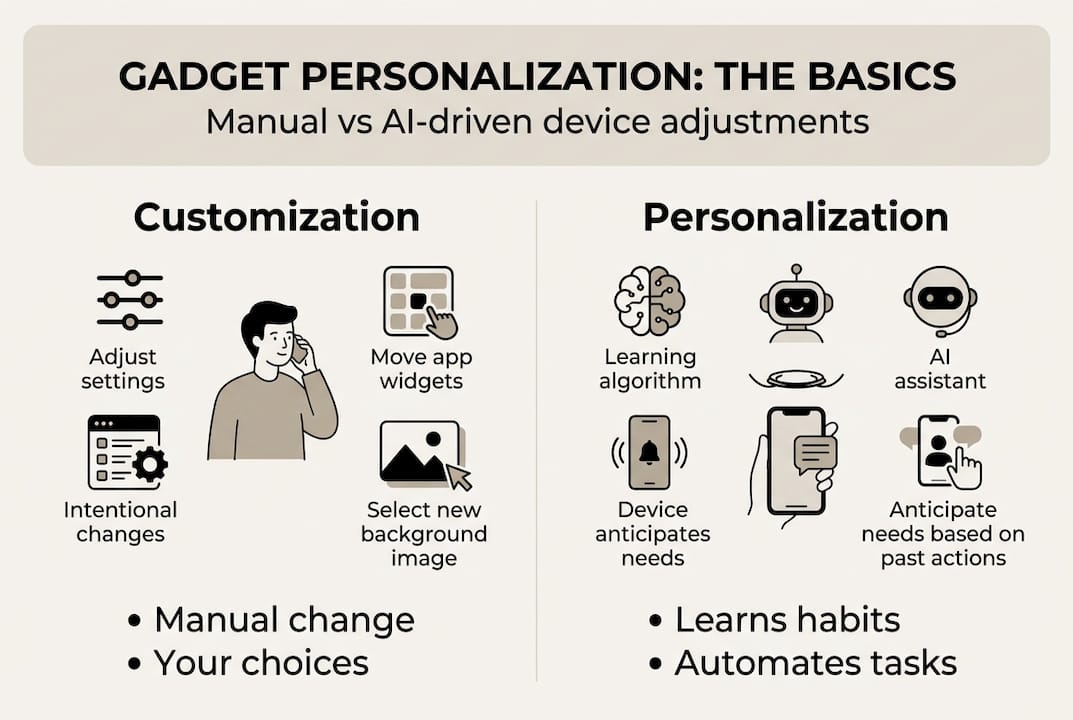
Customization is what you do manually. You pick a dark theme, rearrange your app icons, or set a custom notification sound. You’re in control, making deliberate choices about how your device looks and behaves.
Personalization goes further. It’s when your device starts to learn from your behavior and adapts on its own. Your smart lights dim automatically at 9 PM because you always do that. Your thermostat lowers the temperature before you wake up. You didn’t program it step by step. The system figured it out.
Here’s a quick comparison:
| Feature | Customization | Personalization |
|---|---|---|
| Who controls it? | You (manual input) | The device (AI-driven) |
| Requires setup? | Yes, every time | Learns over time |
| Adapts automatically? | No | Yes |
| Example | Choosing wallpaper | Smart lights matching your mood |
Both matter. But personalization is where the real convenience lives. As personalization basics explain, it shifts the experience from reactive to proactive.
There are a few key reasons why this distinction matters for everyday Greek consumers:
- Convenience without effort: AI-driven personalization removes repetitive manual adjustments
- Smarter energy use: Devices stop running when they know you don’t need them
- Better fit over time: The longer you use a device, the more it understands you
- Privacy responsibility: Personalization often means your data is being collected and used
“The best personalization is invisible. You just notice that everything feels exactly right without thinking about why.”
The real benefits of gadgets only become clear when your devices are set up to serve your actual routines, not just factory defaults. And if you’re still wondering whether investing in a multifunctional gadget makes sense, personalization is exactly why it does. One device that learns your patterns is worth more than five that don’t.
How gadget personalization works: Methods and technologies
Having set the stage with definitions, let’s look at the practical technology powering gadget personalization.
The technology behind personalization ranges from simple settings to sophisticated machine learning models running directly on your devices.
User-driven personalization is your starting point. Wallpapers, layout preferences, ringtones, and notification filters are all in your hands. These are simple but meaningful. They make your device feel like yours from day one.
AI and machine learning take personalization to the next level. Algorithms like LightGBM and XGBoost analyze your usage patterns to predict what you’ll do next. For example, LightGBM achieves over 90% accuracy predicting household activities in smart homes using sensor data. That means your home can know you’re about to watch TV before you even pick up the remote.
Large language models (LLMs) are now entering home automation too. They allow real-time adaptation to evolving preferences without needing to retrain from scratch. Research shows that LLMs increase personalization accuracy by 52.3%, making context-aware automation much more reliable.
Edge ML is especially relevant for Greek consumers. Instead of sending your data to a cloud server, edge devices like the ESP32-CAM or a Raspberry Pi run AI locally in your home. Fast, private, and affordable.
Here’s how the layers of personalization technology stack up:
| Technology level | Example | Benefit |
|---|---|---|
| Manual settings | Custom shortcuts, themes | Quick, easy control |
| AI/ML models | Activity prediction | Automated routines |
| LLMs | Context-aware responses | Real-time adaptation |
| Edge ML | Local processing (ESP32) | Privacy-first automation |
A practical breakdown of how to build your personalization approach:
- Start with basic device settings tailored to your schedule
- Add smart plugs or sensors that respond to triggers (motion, time, temperature)
- Integrate a hub like Google Home or a local solution like Home Assistant
- Let the AI learn for 2-4 weeks before making adjustments
- Review routines monthly and update based on seasonal changes
Pro Tip: If you’re just starting out, explore personalization options explained to understand what your current devices already support before buying anything new.
Real Greek home examples include automating your coffee maker to start at 7 AM on weekdays, setting lights to dim at sunset without touching a switch, and having your TV turn on automatically when you sit on the couch after dinner. When choosing where to start, choosing smart gadgets wisely makes a big difference in how smoothly automation works from day one.

Personalization in everyday life and home automation
Now, let’s make it real: how does personalization show up in your daily routines and home?
Personalization isn’t a luxury for tech enthusiasts. It’s a practical upgrade for anyone who wants their home to feel more responsive and their day to run more smoothly.
Here are the most common personalization use cases for Greek homes:
- Smart thermostats: Learn your preferred temperature for sleeping, working, and relaxing
- Lighting moods: Automatically shift from bright to warm light in the evening
- Morning routines: Coffee starts, blinds open, and your favorite playlist plays at the same time every day
- Reminders and alerts: Personalized notifications that adapt to your actual schedule
- Energy management: Devices power down when sensors detect you’ve left the room
The benefits are measurable. Personalization saves about 45 minutes per week and boosts consumer satisfaction to 69%. That’s almost an extra hour every week for things you actually want to do.
Stat to know: 69% of consumers report higher satisfaction with products and services that feel personally tailored to them.
For Greek families who want smart home benefits without high costs, edge ML is a game changer. A Raspberry Pi-based setup costs around 50-80 euros and can control lights, appliances, and sensors locally. Edge ML optimizes energy and comfort through real-time prediction of user needs, which means your home reacts to you before you even ask.
Imagine a family of four: the parents get gentle wake-up lights that gradually brighten at 6:45 AM, the kids’ room stays cooler during study hours, and the living room automatically enters movie mode when the TV turns on after 8 PM. Nobody had to set a timer. The system just learned.
Pro Tip: Use your gadgets for productivity tips as inspiration when planning your home automation routines. A gadget that fits your workflow is always more useful than one that just looks impressive.
Personalized gadgets guide resources can help you match the right product to the right problem, whether it’s the kitchen, bedroom, or living room.
Challenges: Privacy, over-personalization, and practical tips
Of course, convenience comes with responsibilities. Let’s dig into pitfalls and how to personalize wisely.
Personalization works best when it’s thoughtful. But there are real challenges you should understand before going all in.
Privacy in shared households is the biggest concern. Multi-user households challenge personalization versus privacy, and robust preference-following can be difficult when two or more people have conflicting habits. Your device can’t always know whose preferences to follow.
Over-personalization feels intrusive. When a device seems to know too much, it erodes trust. Ads that follow you across devices, suggestions that feel too targeted, or automation that acts before you’re ready can all feel uncomfortable rather than helpful.
AI limitations are real too. Current models can misread context, especially in unusual situations. If your routine changes because of travel, illness, or guests, the system may keep pushing the wrong automation until you correct it.
Here’s how to personalize safely:
- Use edge devices that process data locally and never send it to external servers
- Set consent controls on every connected device, especially for shared spaces
- Create user profiles where possible so each family member’s preferences are separate
- Review automation logs regularly to catch anything that feels off
- Choose EU-compliant gadgets that respect GDPR data standards
“The most trustworthy personalization is the kind you can see, adjust, and turn off at any time.”
For Greek consumers, EU privacy regulations offer an extra layer of protection. Edge computing keeps data local, addressing the stricter privacy expectations that GDPR enforces across Europe. That’s why we recommend edge-first devices whenever possible. You get the benefits of smart automation without handing your household data to a third party.
For a deeper look at how AI handles complex LLM personalization challenges, especially around conflicting user preferences, the research is worth exploring if you want to go beyond the basics.
Why getting personalization right matters more than ever
With challenges in mind, it’s time to consider what really makes personalization successful in daily life.
Most conversations about gadget personalization focus almost entirely on the technology. And we get it. The tech is impressive. But in our experience, the households that actually benefit from smart personalization aren’t the ones with the most advanced setups. They’re the ones that started simple and stayed intentional.
Trust matters more than automation depth. If someone in your family feels like the home is making decisions they don’t understand, they’ll override it every time. Transparent, explainable automation beats complex black-box AI every single time.
In Greece, economic reality also shapes adoption. Not everyone wants to pay for cloud subscriptions or replace all their appliances. Edge ML solutions built around affordable hardware give real results without financial strain. The goal isn’t a fully automated home. It’s a home that makes your specific routines easier.
Our honest take? Start with gadget productivity insights and build from there. One or two well-chosen, well-set-up devices will outperform a dozen smart gadgets running on defaults. Privacy first, convenience second, full automation third. That’s the order that actually works.
Ready to personalize? Explore gadgets that work for you
Now that you know what works (and what to avoid), here’s how to get started smart.
At AskNik.gr, we’ve put together collections that fit exactly the personalization approaches covered in this guide. Whether you’re upgrading your kitchen with smarter tools or setting up your first connected home routine, we have options that are ready to use and easy to configure.
Browse our kitchen and cooking essentials for gadgets that make your daily rituals faster and more efficient. Or explore the full AskNik gadget shop to find smart home solutions across every category. Free shipping, quality-checked products, and a team ready to help you choose the right fit for your home. Your smarter daily routine is just a few clicks away.
Frequently asked questions
What is the main difference between gadget customization and personalization?
Customization empowers users through manual control, while personalization uses AI to adapt your devices to your habits automatically over time.
Can gadget personalization save time in daily routines?
Yes. AI and personalization save about 45 minutes per week by automating repetitive tasks and anticipating your needs before you act.
How can I personalize gadgets without risking privacy?
Choose devices with edge AI that process data locally on the device, and always set clear consent controls. Edge computing preserves privacy by keeping your information out of third-party cloud servers.
Are there affordable ways for Greek consumers to start with home automation personalization?
Affordable edge ML solutions like Raspberry Pi-based systems offer practical, cost-effective personalization for Greek homes without requiring expensive subscriptions or full appliance replacements.