
TL;DR:
- Smart devices can significantly reduce household management time through automation.
- Prioritize strong Wi-Fi, clear device naming, and simple automations for effective setup.
- Focus on essential devices and expand gradually, considering Greek home environment considerations.
Managing a busy Greek household is no small task. Between juggling work, family, and daily chores, keeping your home organized can feel like a full-time job. The good news? Smart devices can take a serious load off your shoulders. Studies show that homeowners who automate even a few routines save meaningful time every week. In this guide, we walk you through everything you need: how to prepare your home, which devices to prioritize, how to set them up room by room, and how to avoid the most common pitfalls. Whether you live in an Athens apartment or a Thessaloniki villa, these steps work for you.
Table of Contents
- What you need to start organizing your home with smart devices
- Step-by-step: Organize key spaces with smart devices
- Making smart organization work in Greek homes
- Avoiding common mistakes and optimizing your smart setup
- Why simplicity is the ultimate smart organization hack
- Take the next step: Bring smart organization to your kitchen
- Frequently asked questions
Key Takeaways
| Point | Details |
|---|---|
| Start with a strong foundation | Reliable Wi-Fi and a clear platform choice are essential for smart home success. |
| Focus on key devices | Smart plugs, lighting, and robot vacuums give you fast, clear organizing wins. |
| Prioritize simplicity | A few well-designed automations outperform dozens of complicated routines. |
| Consider Greece-specific factors | Choose devices with Matter support and local retailer warranties for best results. |
What you need to start organizing your home with smart devices
Before you buy a single device, you need a solid foundation. Think of it like building a house: skip the groundwork, and everything wobbles later.
Start with your Wi-Fi. A weak or patchy network is the number one reason smart home setups fail. For most Greek homes, especially older buildings with thick concrete walls, a mesh Wi-Fi system is the smartest investment you can make. Look for routers that support Wi-Fi 6 or Wi-Fi 7 for faster, more stable connections across every room.
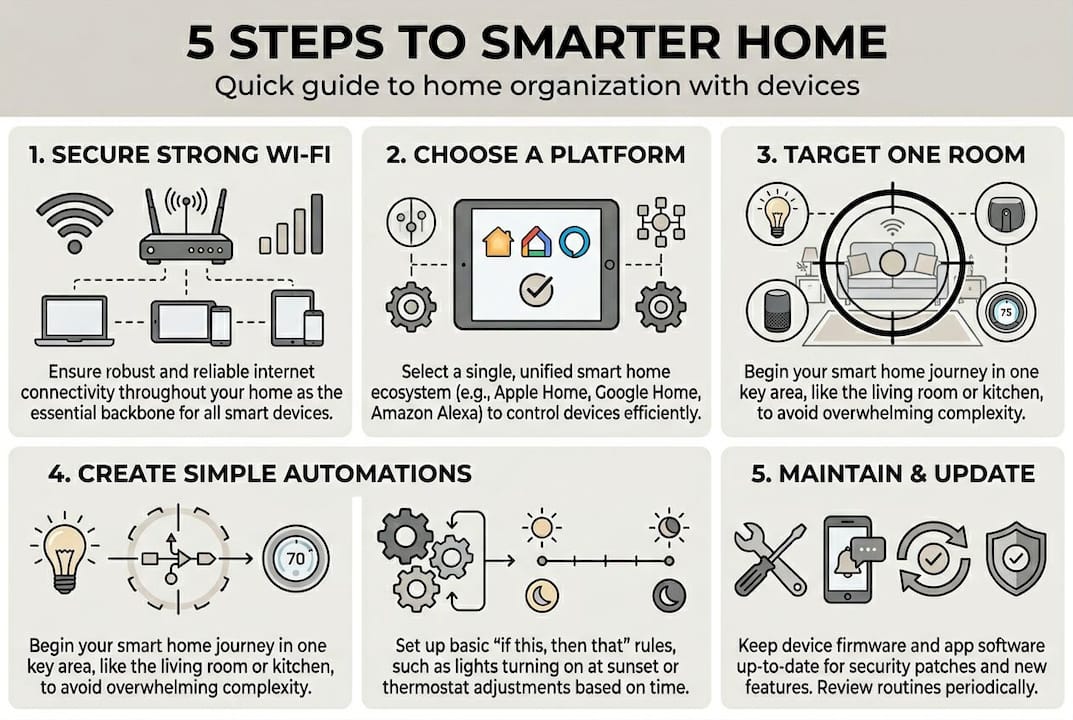
Choose your smart home platform early. The three main options are Amazon Alexa, Google Home, and Apple HomeKit. Each has strengths, but the most important factor in 2026 is Matter compatibility. Matter is an open standard widely adopted across the EU, meaning your devices can work together regardless of brand. As best practices recommend, strong Wi-Fi, choosing an ecosystem, and starting with essential devices are the three pillars of a successful setup.
Here is a quick comparison to help you decide:
| Platform | Voice assistant | Matter support | Best for |
|---|---|---|---|
| Amazon Alexa | Alexa | Yes | Wide device range |
| Google Home | Google Assistant | Yes | Android users |
| Apple HomeKit | Siri | Yes | iPhone/iPad users |
Once your platform is chosen, focus on these essentials:
- Security first: Smart locks, cameras, and motion sensors protect your home and give you peace of mind.
- Device naming: Label every device clearly (e.g., “Kitchen Plug” not “Device 3”) so voice commands and automations work without confusion.
- Zoning: Group devices by room for easier control.
- Local warranty: Buy from EU-certified retailers for faster support and valid guarantees.
Pro Tip: When choosing the best gadgets for your home, prioritize devices that support local control. This means they work even if the cloud server goes down, which adds reliability to your daily routines.
Step-by-step: Organize key spaces with smart devices
With your foundation in place, it’s time to get hands-on and bring order to each room.
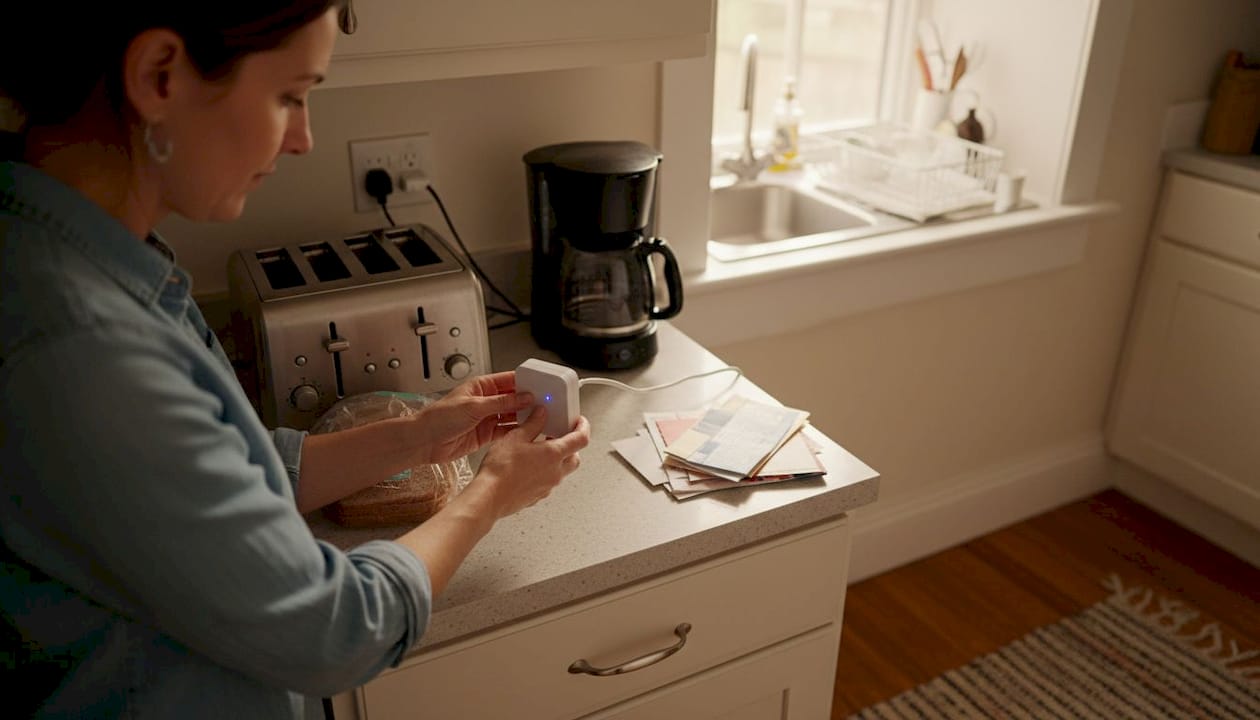
Top-rated devices for organization include smart plugs, lighting, thermostats, and robot vacuums. Here is how to put them to work, room by room.
Kitchen
- Plug your coffee maker and toaster into smart plugs. Schedule them to turn on at your wake-up time.
- Add an energy monitoring plug to track which appliances use the most power.
- Set an automation: if you leave home, all kitchen plugs turn off automatically.
Living room
- Install smart bulbs or a smart light switch. Create a “movie night” scene that dims lights with one voice command.
- Connect your TV or soundbar to a smart plug for easy on/off control.
- Schedule a robot vacuum to clean every morning at 9 AM while you are out.
Bedrooms
- Add a smart thermostat to maintain a comfortable temperature overnight, cutting energy waste.
- Install automated blinds or curtains that open gradually at sunrise for a natural wake-up.
- Set a “good night” scene that turns off all lights and locks the front door simultaneously.
Here is a side-by-side look at how these devices compare on impact:
| Device | Room | Key benefit | Difficulty to set up |
|---|---|---|---|
| Smart plug | Kitchen | Automate appliances | Easy |
| Smart bulb | Living room | Mood and energy control | Easy |
| Robot vacuum | Living room | Hands-free cleaning | Easy |
| Smart thermostat | Bedroom | Comfort and savings | Moderate |
| Automated blinds | Bedroom | Sleep quality | Moderate |
For a deeper look at all the types of smart home devices available today, you will find plenty of options that fit any budget. You can also check CNET’s device recommendations for independent reviews.
Pro Tip: Start with just one room. Master it, then expand. Trying to automate your entire home at once is overwhelming and leads to abandoned setups.
Making smart organization work in Greek homes
With your rooms organized, it’s critical to fine-tune your setup for Greece’s unique environment.
Greek homes present specific challenges that most generic smart home guides ignore. Here is what you need to know:
- Thick walls: Many Greek buildings, especially pre-1980s constructions, have dense concrete walls that block Wi-Fi signals. A mesh network with at least two nodes solves this effectively.
- Power standards: Greece uses 230V/50Hz, standard across the EU. Most smart devices sold in Europe are compatible, but always check before importing from the US or Asia.
- Rental restrictions: If you rent, avoid hardwired smart switches. Stick to plug-in smart plugs, portable smart lights, and battery-powered sensors that leave no marks.
- Language support: Choose platforms and apps that offer Greek language support for easier daily use, especially for older family members.
One major advantage Greek homeowners have is access to the EU’s strong consumer protection framework. EU Matter protocol adoption is high, meaning locally purchased devices are more likely to receive long-term software updates and warranty support.
Key insight: Buying from a local Greek or EU retailer is not just about convenience. It means faster returns, local-language support, and devices that meet EU safety standards. Importing from outside the EU can void warranties and create compatibility headaches.
For a broader overview, our smart home guide for Greece covers the essentials in detail. You can also explore how smart setups contribute to energy savings in Greek homes, which is a growing priority for many households facing rising utility costs.
Avoid over-automating your home from day one. A focused setup with five to eight reliable devices beats a cluttered network of twenty poorly configured ones every time.
Avoiding common mistakes and optimizing your smart setup
Now that you understand local considerations, let’s ensure your home runs smoothly with some key optimization tips.
Even well-intentioned smart home setups can go sideways. Here are the most common mistakes and how to fix them:
- Weak Wi-Fi: If your router is more than three years old or sits in a closet, your devices will drop offline constantly. Upgrade your network before adding more devices.
- Device overload: Adding too many devices too fast creates a confusing, unreliable system. Add one device at a time, test it fully, then move on.
- Unclear naming: Devices named “Switch 1” or “Bulb A” cause voice command failures. Rename everything clearly and consistently.
- Ignoring security basics: Change default passwords on every device. Enable two-factor authentication on your smart home app. Review which devices have camera or microphone access.
- Skipping automation audits: Set a reminder every three months to review your automations. Remove ones you no longer use and update schedules for seasonal changes.
Correct automation and setup can deliver energy savings of up to 30%, but over-automation is one of the top causes of system failure and user frustration.
To get the most from your setup, follow this optimization routine:
- Test every automation once a week for the first month.
- Check device firmware updates monthly.
- Review your energy reports if your devices support them.
- Simplify any routine that requires more than three steps.
Pro Tip: For a full walkthrough on enhancing your smart home, we have put together a practical guide specifically for Greek homeowners that covers security, energy, and comfort in one place.
Why simplicity is the ultimate smart organization hack
Here is something most smart home content will not tell you: more devices do not equal more organization. We have seen it time and again. Homeowners get excited, buy a dozen gadgets, set up complex automations, and within two months, half the devices are unplugged because the system became too confusing to manage.
The setups that actually stick are simple ones. A morning routine that turns on the coffee maker, opens the blinds, and plays the news. An evening routine that locks the door, dims the lights, and sets the thermostat. That is it. Those two automations alone change how a home feels.
Local control matters more than cloud integrations. When your devices work without depending on a distant server, they are faster, more reliable, and more private. This is especially relevant in Greece, where internet outages, while rare, do happen.
Our honest advice: pick three automations that solve real daily frustrations. Master them. Then, only if you want more, add one at a time. You can explore Greek smart home examples to see what real households have done with minimal devices and maximum impact. The goal is a home that works for you, not one you have to manage constantly.
Take the next step: Bring smart organization to your kitchen
If you are inspired to upgrade your home, start with the space that runs on order: your kitchen.
The kitchen is where routines begin and end every day. A few well-chosen smart devices here, like automated plugs, energy monitors, and smart lighting, can save you time, reduce waste, and make cooking genuinely enjoyable. At AskNik.gr, we have curated a range of kitchen and cooking essentials that are ready to use right out of the box. Every product ships free and comes with a quality check before it reaches your door. Browse our full smart living store to find devices that match your home, your budget, and your lifestyle. Our team is always available if you need guidance on where to start.
Frequently asked questions
What are the top three smart devices to start home organization?
Smart plugs, robot vacuums, and lighting are the most impactful starter devices for organizing your home. They are affordable, easy to set up, and deliver immediate, visible results.
How much energy can a smart home setup save?
A well-managed smart home can save 10 to 30% on energy, especially with automated lighting and thermostats. Results vary based on your current habits and the devices you choose.
Is Matter protocol important for Greek homes?
Yes. EU Matter adoption is high, making it the preferred standard for local control, long-term reliability, and warranty support across Greece and the broader EU.
What’s the biggest mistake when starting with smart devices?
Over-complicating automations and not securing strong Wi-Fi first are the two most common errors. Fix your network before adding devices, and keep your automations simple.